Introduction
Sept-20 2022
This single-board computer from SolidRun is interesting for low-cost network applications requiring 10GbE. It has very capable routing performance which can be combined with storage for specialized applications.
I've done some performance testing on the single-shot version (the double-shot version is more powerful) and designed IO Shield and a extension board for ATX cases.
Hardware
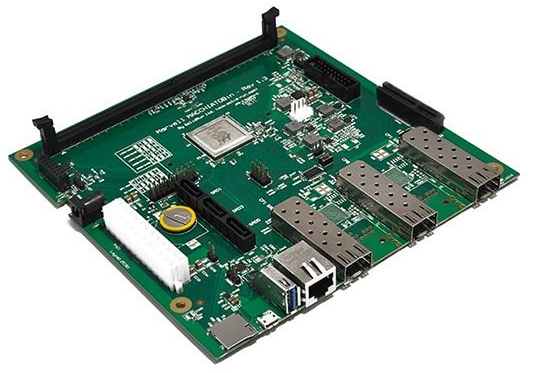
MACCHIATObin Single Shot- Quad-core 1.6 GHz A8040.
CPU: Marvel ARMADA A8040 Arm® Cortex® A72
Memory: 16GB DDR4 RAM
Built-in storage: 8GB eMMC
Network: Gigabit RJ45, dual 10GbE SFP+, single 2.5Gbe SFP+
Format: Mini-ITX (170mm x 170mm)
This single-board computer (SBC) is used for network applications requiring affordable 10GbE. It has very capable routing performance which can be combined with storage and specialized applications.
Storage and Routing performance
I tested using the SBC as a low-power NAS using 1/5/10 GbE ports on my desktop connected to the 1/10GbE ports on the SBC (no 2.5GbE SFP) with various storage (RAMdisk, NVME SSD, SATA SSD, BTRFS raided HDD) and got following rough top performances:
Routing with iperf3: GbE--GbE: 565 Mbits/sec ~ 68 Mbytes/sec
Routing with iperf3: 5GbE--10GbE:  4.61 Gbits/sec ~ 549 MBytes/sec
Routing with iperf3: 10GbE--10GbE: 9.08 Gbits/sec ~ 1051 MBytes/sec

Storage with rsync, 1G zero file: GbE--GbE: 67.88MB/s
Storage with rsync, 1G zero file: 5GbE--10GbE: 337.28 MB/s
Storage with rsync, 1G zero file: 10GbE--10GbE: 345.35 MB/s

Storage with bbcp, 1G zero file: 5GbE--10GbE: 400 MB/s
Storage with bbcp, 1G zero file: 10GbE--10GbE: 400 MB/s
Routing was as expected, and for a single file transfer storage saturates at 5GbE (probably CPU limitation). Multithreaded bbcp was the fastest transfer solution. Not a very scientific test method but hopefully you get a rough understanding.
Note: I have not changed the MTU in these tests.
Instructions
Flash UEFI Boot on SPI flash
The MacchiatoBin comes with TianoCore EDK2 firmware installed on the SPI flash. If the SPI Flash needs to be reflashed, this guide covers flashing the UEFI boot from U-Boot running on MMC.
Download the pre-build SPI flash binary from SolidRun and put it on an USB stick.
# variables:
# kernel_addr_r=0x5000000
# filesize=2730940=0x29abbc

# start USB stack
usb start

# load uefi-mcbin-spi.bin to ram
load usb 0:1 $kernel_addr_r uefi-mcbin-spi.bin

# initialize spi flash
sf probe

# erase flash
sf erase 0 0x400000

# write loaded file
sf write $kernel_addr_r 0 0x$filesize
References
[3] SolidRun Images
UEFI Boot, Linux Bootloader, EMMC root partition(s)
- Two root partitions (one for Buildroot and one for Arch Linux) on eMMC
- Boot menu to switch between Buildroot and Arch Linux, headless or via console
- Boot via UEFI (TianoCore EDK II) on SPI Flash
- Static MAC address for Ethernet interfaces
- No MMC (SD-Card) required after setup
Why?
I want to utilize the onboard eMMC and use the SBC standalone without an SD-Card but still be able to use an SD-Card as rootfs or secondary storage. First I followed the instructions [3] to use U-Boot installed on eMMC data partition, the board refused to boot. Then tried the eMMC boot0 and boot1, the board refused to boot. Mmc flags looked good, the eMMC content looked good when dumping but still no boot.
New strategy, there is an bootable SPI Flash available with pre-installed Tianocore/EDK2 firmware. For this to work I need a EFI FAT partition and root partition(s). The SPI Flash is too small to fit my kernel image I need so the partitions need to be on the eMMC. We'll use Arch Linux on a MMC to boot and configure the system using the console:
screen /dev/ttyUSB0 115200
Since I'm developing solutions for both Buildroot and Arch Linux I wanted both on the eMMC, obviously other headless EFI/ARM supported OS-combination is possible.
The MacchiatoBin uses a random Ethernet MAC so to enable DHCP usage the MAC addresses will need to be set by the OS. In U-Boot the MAC addresses can be stored in the SPI flash and set by U-Boot before initilizing the kernel but I have not found a way to do this in UEFI boot mode.
Boot Arch Linux from SD-Card (U-Boot)
Prepare an SD-Card with Arch Linux [2] and set the dip switches to SD CARD boot. The gptfdisk package or similar is needed to create a GPT table on the EMMC (fdisk does not support GPT and EFI requires GPT). If the SBC does not have an Internet connection, mount and put it on the SD-CARD.
Boot the MacchiatoBin and prepare the eMMC partitions:
# (Optional) erase previous partition table on EMMC
dd if=/dev/zero of=/dev/mmcblk0 conv=notrunc

# A 500M+3.4G+3.4G eMMC table would look like this:
gdisk /dev/mmcblk0
-----------------------------------------------------------------------------
Number  Start (sector)    End (sector)  Size       Code  Name
   1            2048         1026047   500.0 MiB   EF00  EFI system partition
   2         1026048         8146943   3.4 GiB     8300  Linux filesystem
   3         8146944        15267839   3.4 GiB     8300  Linux filesystem

# Formatting
mkfs.fat -F 32 /dev/mmcblk0p1
mkfs.ext4 /dev/mmcblk0p2
mkfs.ext4 /dev/mmcblk0p3

# Mount new boot partition to /mnt
mount /dev/mmcblk0p1 /mnt

# Note: It may be possible to modprobe efivarfs and mount EFI when booting in
# U-Boot mode, if so the bootctl should install fully and reboot to Arch on
# SD-Card via UEFI would not be needed. I have not tried this:
modprobe efivarfs
mount -t efivarfs efivarfs /sys/firmware/efi/efivars

# Install boot manager
bootctl --esp-path=/mnt install

# Create EFI entry for the SDCARD

/mnt/loader/entries/arch_sdcard.conf
-----------------------------------------------------------------------------------
title   Arch Linux
linux   /Image
initrd  /initramfs-linux.img
options root=UUID=5ae6358a-9dfb-4f06-bffe-edbad04c4ad8 rw ipv6.disable=1 loglevel=3

# UUID needs to be replaced to point to rootfs on the SD-CARD.

# Copy kernel and initramfs from SD-Card to boot partition
cp /boot/Image /mnt
cp /boot/initramfs-linux.img /mnt

# Unmount
umount /mnt

# Turn off the board and change dip switches to SPI ROM and restart (cold)
Boot Arch Linux from SD-Card (UEFI)
Now the Tianocore/EDK2 should load and boot Arch Linux via UEFI. Note: For this to work the UEFI boot needs to be flashed on the SPI memory. Instructions.
# Repeat the bootctl installation, the Linux Boot Manager needs an EFI environment to be installed
# this was why the reboot was required.
mount /dev/mmcblk0p1 /mnt
bootctl --esp-path=/mnt install
There is now a functional second-stage EFI bootloader in the eMMC!
Install Buildroot on eMMC partition
This guide assumes you already have a Builroot image, I'm using
buildroot/output/images/rootfs.tar
# Buildroot on the second partition
mount /dev/mmcblk0p2 /mnt

# Extract rootfs.tar in root partition
bsdtar -xpf rootfs.tar -C /mnt

# Now move the boot image to the EFI partition
mv /mnt/boot /mnt/boot2
mkdir /mnt/boot
mount /dev/mmcblk0p1 /mnt/boot
mkdir /mnt/boot/buildroot
mv /mnt/boot2/Image /mnt/boot/builroot/
mv /mnt/boot2/armada-8040-mcbin.dtb /mnt/boot/builroot/

genfstab /mnt >> /mnt/etc/fstab

# Should look something like this

/mnt/etc/fstab
-----------------------------------------------------------------------------------------
/dev/mmcblk0p2  /               ext4    rw,relatime     0       1
/dev/mmcblk0p1  /boot           vfat    rw,relatime     0       2
proc            /proc           proc    defaults        0       0
devpts          /dev/pts        devpts  defaults,gid=5,mode=620,ptmxmode=0666   0       0
tmpfs           /dev/shm        tmpfs   mode=0777       0       0
tmpfs           /tmp            tmpfs   mode=1777       0       0
tmpfs           /run            tmpfs   mode=0755,nosuid,nodev  0       0
sysfs           /sys            sysfs   defaults        0       0
efivarfs        /sys/firmware/efi/efivars    efivarfs    defaults    0 0

# Now add the boot entry

/mnt/boot/loader/entries/buildroot_emmc1.conf
-----------------------------------------------------------------------------------------
title         Buildroot (EMMC)
linux         /buildroot/Image
devicetree    /buildroot/armada-8040-mcbin.dtb
options       root=/dev/mmcblk0p2 rw ipv6.disable=1 loglevel=3

# Note, mounting or using UUID caused boot issue.

# With buildroot the MAC addresses can be set in the interface file
# and this example uses a mix of fixed and dynamic IPs

/mnt/etc/network/interfaces
-----------------------------------------------------------------------------------------
auto lo
iface lo inet loopback

auto eth0
iface eth0 inet static
   hwaddress ether a6:23:92:c6:58:52
   address 192.168.50.2
   netmask 255.255.255.0
   gateway 192.168.50.1

auto eth1
iface eth1 inet static
   hwaddress ether 62:e0:da:14:8c:70
   address 192.168.50.3
   netmask 255.255.255.0
   gateway 192.168.50.1

auto eth2
iface eth2 inet dhcp
   hwaddress ether 42:f8:49:92:fc:65

auto eth3
iface eth3 inet static
   hwaddress 02:a2:3a:5c:ee:ee
   address 192.168.50.4
   netmask 255.255.255.0
   gateway 192.168.50.1


--------------------------------------------------------------------------------------

When done, unmount the buildroot partition
umount -R /mnt
Now the SBC should have a working Buildroot installed on eMMC partition 2.
Install Arch Linux on eMMC partition
Return to Arch Linux on the SD-Card to setup the eMMC version. Some tweaks necessary but mostly using the Arch Linux installation guide [4].
# Arch Linux on the third partition
mount /dev/mmcblk0p3 /mnt

# Note:
# I don't mount the boot partition but instead add files to
# /boot manually at this point.

# Install base system on third partition
pacstrap /mnt base linux linux-firmware wget nano ethtool

# Adjusting where mkinitrd places the initrd, change default_image
# in /etc/mkinitcpio.d/linux-aarch64.preset, example
default_image="/boot/archlinux/initramfs-linux.img"
fallback_image="/boot/archlinux/initramfs-linux-fallback.img"

# Now initramfs-linux-fallback.img and initramfs-linux.img will end
# up in /boot/archlinux/ when reinstalled.

# Now mount the boot partition and copy default files to archlinux
# subdirectory.
mv /mnt/boot /mnt/boot2
mkdir /mnt/boot
mount /dev/mmcblk0p1 /mnt/boot
mkdir /mnt/boot/archlinux
mv /mnt/boot2/* /mnt/boot
rmdir /mnt/boot2

# Pacstrap will still copy firmware and kernel image files to /boot
# when upgrading so I usually block these packages in /etc/pacman.conf
# and upgrade these manually when needed and move them manually.
# This can be done automatically using pacman hooks, not covered here.

# Now the fstab
genfstab /mnt >> /mnt/fstab

# Should look something like this

/mnt/etc/fstab
-----------------------------------------------------------------------------------------
/dev/mmcblk0p3          /               ext4            rw,relatime     0 1
/dev/mmcblk0p1          /boot           vfat            rw,relatime     0 2

# EFI boot entry

/mnt/boot/loader/entries/arch_emmc2.conf
-----------------------------------------------------------------------------------------
title       Arch Linux (EMMC)
linux       /archlinux/Image
devicetree  /dtbs/marvell/armada-8040-mcbin-singleshot.dtb
initrd      /archlinux/initramfs-linux.img
options     root=/dev/mmcblk0p3 rw ipv6.disable=1 loglevel=3


# Now chroot to target
arch-chroot /mnt

# For networking to work, the marvell module needs to be loaded, add
MODULES=(marvell marvell10g)
# to /mnt/etc/mkinitcpio.conf and execute
mkinitcpio -P

# Set root password
passwd

# systemd-networkd can be configured to support static MAC

/etc/systemd/network/30-eth2.link
---------------------------------------
[Match]
OriginalName=eth2

[Link]
MACAddress=42:f8:49:92:fc:65


/etc/systemd/network/30-eth2.network
---------------------------------------
[Match]
Name=eth2

[Network]
DHCP=yes
IPv6PrivacyExtensions=yes

[DHCPv4]
RouteMetric=512

[DHCPv6]
RouteMetric=512
Now the SBC should have a working Arch Linux installed on eMMC partition 3.
Success
There should now be two OS installed with a interactive UEFI boot loader.
BootROM - 2.03
Starting CP-1 IOROM 1.07
Booting from SPI NOR flash 1 (0x32)
Found valid image at boot postion 0x000
NOTICE:  Starting binary extension
NOTICE:  SVC: DEV ID: 8040, FREQ Mode: 0x0
NOTICE:  SVC: AVS work point changed from 0x29 to 0x29
mv_ddr: devel-g02e23db-dirty (Oct 14 2021 - 03:06:02 PM)
mv_ddr: completed successfully
NOTICE:  Cold boot
NOTICE:  Booting Trusted Firmware
NOTICE:  BL1: v2.5(release):v2.5
NOTICE:  BL1: Built : 15:06:06, Oct 14 2021
NOTICE:  BL1: Booting BL2
NOTICE:  BL2: v2.5(release):v2.5
NOTICE:  BL2: Built : 15:06:07, Oct 14 2021
NOTICE:  SCP_BL2 contains 7 concatenated images
NOTICE:  Load image to CP1 MG
NOTICE:  Loading MG image from address 0x402305c Size 0xe0f0 to MG at 0xf4100000
NOTICE:  Load image to CP0 MG
NOTICE:  Loading MG image from address 0x403114c Size 0xe0f0 to MG at 0xf2100000
NOTICE:  Skipping MSS CP3 related image
NOTICE:  Skipping MSS CP2 related image
NOTICE:  Load image to CP1 MSS AP0
NOTICE:  SECURELY Loading MSS FW from addr. 0x4042c34 Size 0x1cfc to MSS at 0xf4280000
NOTICE:  CP MSS startup is postponed
NOTICE:  Done
NOTICE:  Load image to CP0 MSS AP0
NOTICE:  SECURELY Loading MSS FW from addr. 0x4044930 Size 0x1cfc to MSS at 0xf2280000
NOTICE:  CP MSS startup is postponed
NOTICE:  Done
NOTICE:  Load image to AP0 MSS
NOTICE:   Loading MSS FW from addr. 0x404662c Size 0x5400 to MSS at 0xf0580000
NOTICE:  Done
NOTICE:  SCP Image doesn't contain PM firmware
NOTICE:  BL1: Booting BL31
lNOTICE:  Starting CP0 MSS CPU
NOTICE:  Starting CP1 MSS CPU
NOTICE:  MSS PM is not supported in this build
NOTICE:  BL31: v2.5(release):v2.5
NOTICE:  BL31: Built : 15:06:09, Oct 14 2021

SolidRun Armada 8040 MacchiatoBin Init

Comphy0-0: PCIE0         5 Gbps
Comphy0-1: PCIE0         5 Gbps
Comphy0-2: PCIE0         5 Gbps
Comphy0-3: PCIE0         5 Gbps
Comphy0-4: SFI           10.31 Gbps
Comphy0-5: SATA1         5 Gbps

Comphy1-0: SGMII1        1.25 Gbps
Comphy1-1: SATA2         5 Gbps
Comphy1-2: USB3_HOST0    5 Gbps
Comphy1-3: SATA3         5 Gbps
Comphy1-4: SFI           10.31 Gbps
Comphy1-5: SGMII2        3.125 Gbps

UTMI PHY 0 initialized to USB Host0
UTMI PHY 1 initialized to USB Host1
UTMI PHY 2 initialized to USB Host0
Succesfully installed protocol interfaces
Error: Image at 000BF71C000 start failed: 00000001
Detected w25q32bv SPI NOR flash with page size 256 B, erase size 4 KB, total 4 MB

---------------------------------------------------------------------------------

Tianocore/EDK2 firmware version EDK2 SR 1.0
Press ESCAPE for boot options ....Error reported by SDHCI

---------------------------------------------------------------------------------

Interrupt status = 8000
Error interrupt status = 1
TRB failed with Device Error
Printing SD_MMC_HC_TRB
Slot: 0
BlockSize: 512
Data: 0
DataLen: 0
Read: 0
DataPhy: 0
DataMap: 0
Mode: 0
AdmaLengthMode: 0
Event: 0
Started: 0
CommandComplete: 0
Timeout: 2500000
Retries: 5
PioModeTransferCompleted: 0
PioBlockIndex: 0
Adma32Desc: 0
Adma64V3Desc: 0
Adma64V4Desc: 0
AdmaMap: 0
AdmaPages: 0
Printing EFI_SD_MMC_PASS_THRU_COMMAND_PACKET
Command index: 7, argument: 0
Command type: 2, response type: 0
Response 0: 0, 1: 0, 2: 0, 3: 0
Timeout: 2500000
InDataBuffer: 0
OutDataBuffer: 0
InTransferLength: 0
OutTransferLength: 0
TransactionStatus: Success
Then we get the interactive EFI boot menu
               Buildroot (EMMC)
              Arch Linux (SD-CARD)
               Arch Linux (EMMC)
               EFI Default Loader
         Reboot Into Firmware Interface
Without SD-CARD there are a couple of non-fatal error messages.
After selecting boot entry the kernel takes over...:
EFI stub: Booting Linux Kernel...
EFI stub: Using DTB from configuration table
EFI stub: Exiting boot services...
Starting syslogd: OK
Starting klogd: OK
Running sysctl: OK
Populating /dev using udev: done
Initializing random number generator: OK
Saving random seed: OK
Starting system message bus: done
Starting iptables: OK
Starting network: RTNETLINK answers: File exists
udhcpc: started, v1.35.0
udhcpc: broadcasting discover
udhcpc: no lease, forking to background
Not enough information: "dev" argument is required.
RTNETLINK answers: Network is unreachable
FAIL
Starting dhcpcd...
dhcpcd-9.4.1 starting
dev: loaded udev
DUID 00:04:97:c9:39:25:12:73:4f:03:9f:75:2f:2b:7e:d1:94:80
no interfaces have a carrier
Starting ntpd: OK
Starting sshd: OK

Welcome to Buildroot for Marvell MacchiatoBin
mcbin login: root
Password:

# ip a
1: lo: <LOOPBACK,UP,LOWER_UP> mtu 65536 qdisc noqueue state UNKNOWN group default qlen 1000
    link/loopback 00:00:00:00:00:00 brd 00:00:00:00:00:00
    inet 127.0.0.1/8 scope host lo
       valid_lft forever preferred_lft forever
2: eth0: <NO-CARRIER,BROADCAST,MULTICAST,UP> mtu 1500 qdisc mq state DOWN group default qlen 2048
    link/ether a6:23:92:c6:58:52 brd ff:ff:ff:ff:ff:ff
    inet 192.168.50.2/24 scope global eth0
       valid_lft forever preferred_lft forever
3: eth1: <NO-CARRIER,BROADCAST,MULTICAST,UP> mtu 1500 qdisc mq state DOWN group default qlen 2048
    link/ether 62:e0:da:14:8c:70 brd ff:ff:ff:ff:ff:ff
    inet 192.168.50.3/24 scope global eth1
       valid_lft forever preferred_lft forever
4: eth2: <BROADCAST,MULTICAST,UP,LOWER_UP> mtu 1500 qdisc mq state UP group default qlen 2048
    link/ether 42:f8:49:92:fc:65 brd ff:ff:ff:ff:ff:ff
    inet 192.168.31.40/24 brd 192.168.31.255 scope global dynamic eth2
       valid_lft 42102sec preferred_lft 36702sec
    inet 169.254.27.200/16 brd 169.254.255.255 scope global noprefixroute eth2
       valid_lft forever preferred_lft forever
5: eth3: <NO-CARRIER,BROADCAST,MULTICAST,UP> mtu 1500 qdisc mq state DOWN group default qlen 2048
    link/ether da:02:71:64:2f:64 brd ff:ff:ff:ff:ff:ff
    inet 192.168.50.4/24 scope global eth3
       valid_lft forever preferred_lft forever
Arch Linux:
EFI stub: Booting Linux Kernel...
EFI stub: Using DTB from configuration table
EFI stub: Loaded initrd from command line option
EFI stub: Exiting boot services...
:: running early hook [udev]
Starting version 251.4-1-arch
:: running hook [udev]
:: Triggering uevents...
:: performing fsck on '/dev/mmcblk0p3'
/dev/mmcblk0p3: clean, 33721/222656 files, 377361/890112 blocks
:: mounting '/dev/mmcblk0p3' on real root
:: running cleanup hook [udev]

Welcome to Arch Linux ARM!

[  OK  ] Created slice Slice /system/getty.
[  OK  ] Created slice Slice /system/modprobe.
[  OK  ] Created slice Slice /system/serial-getty.
[  OK  ] Created slice User and Session Slice.
[  OK  ] Started Dispatch Password …ts to Console Directory Watch.
[  OK  ] Started Forward Password R…uests to Wall Directory Watch.
[  OK  ] Set up automount Arbitrary…s File System Automount Point.
[  OK  ] Reached target Local Encrypted Volumes.
[  OK  ] Reached target Local Integrity Protected Volumes.
[  OK  ] Reached target Path Units.
[  OK  ] Reached target Remote File Systems.
[  OK  ] Reached target Slice Units.
[  OK  ] Reached target Swaps.
[  OK  ] Reached target Local Verity Protected Volumes.
[  OK  ] Listening on Device-mapper event daemon FIFOs.
[  OK  ] Listening on Process Core Dump Socket.
[  OK  ] Listening on Journal Audit Socket.
[  OK  ] Listening on Journal Socket (/dev/log).
[  OK  ] Listening on Journal Socket.
[  OK  ] Listening on Network Service Netlink Socket.
[  OK  ] Listening on udev Control Socket.
[  OK  ] Listening on udev Kernel Socket.
         Mounting Huge Pages File System...
         Mounting POSIX Message Queue File System...
         Mounting Kernel Debug File System...
         Mounting Temporary Directory /tmp...
         Starting Create List of Static Device Nodes...
         Starting Load Kernel Module configfs...
         Starting Load Kernel Module drm...
         Starting Load Kernel Module fuse...
         Starting Journal Service...
         Starting Generate network …ts from Kernel command line...
         Starting Remount Root and Kernel File Systems...
         Starting Apply Kernel Variables...
         Starting Coldplug All udev Devices...
[  OK  ] Mounted Huge Pages File System.
[  OK  ] Mounted POSIX Message Queue File System.
[  OK  ] Mounted Kernel Debug File System.
[  OK  ] Mounted Temporary Directory /tmp.
[  OK  ] Started Journal Service.
[  OK  ] Finished Create List of Static Device Nodes.
[  OK  ] Finished Load Kernel Module configfs.
[  OK  ] Finished Load Kernel Module drm.
[  OK  ] Finished Load Kernel Module fuse.
[  OK  ] Finished Generate network units from Kernel command line.
[  OK  ] Finished Remount Root and Kernel File Systems.
[  OK  ] Finished Apply Kernel Variables.
[  OK  ] Reached target Preparation for Network.
         Mounting FUSE Control File System...
         Mounting Kernel Configuration File System...
         Starting Flush Journal to Persistent Storage...
         Starting Load/Save Random Seed...
         Starting Create Static Device Nodes in /dev...
[  OK  ] Mounted FUSE Control File System.
[  OK  ] Mounted Kernel Configuration File System.
[  OK  ] Finished Load/Save Random Seed.
[  OK  ] Finished Create Static Device Nodes in /dev.
[  OK  ] Finished Coldplug All udev Devices.
[  OK  ] Reached target Preparation for Local File Systems.
         Starting Rule-based Manage…for Device Events and Files...
[  OK  ] Finished Flush Journal to Persistent Storage.
[  OK  ] Started Rule-based Manager for Device Events and Files.
         Starting Network Configuration...
[  OK  ] Found device /dev/ttyS0.
[  OK  ] Started Network Configuration.
[  OK  ] Found device /dev/mmcblk0p1.
         Mounting /boot...
[  OK  ] Mounted /boot.
[  OK  ] Reached target Local File Systems.
         Starting Create Volatile Files and Directories...
[  OK  ] Finished Create Volatile Files and Directories.
[  OK  ] Listening on Load/Save RF …itch Status /dev/rfkill Watch.
         Starting Network Name Resolution...
         Starting Record System Boot/Shutdown in UTMP...
[  OK  ] Finished Record System Boot/Shutdown in UTMP.
[  OK  ] Started Network Name Resolution.
[  OK  ] Reached target Network.
[  OK  ] Reached target Host and Network Name Lookups.
[  OK  ] Reached target System Initialization.
[  OK  ] Started Refresh existing P…f archlinux-keyring regularly.
[  OK  ] Started Daily verification of password and group files.
[  OK  ] Started Daily Cleanup of Temporary Directories.
[  OK  ] Reached target Timer Units.
[  OK  ] Listening on D-Bus System Message Bus Socket.
[  OK  ] Reached target Socket Units.
[  OK  ] Reached target Basic System.
         Starting D-Bus System Message Bus...
         Starting User Login Management...
         Starting Permit User Sessions...
[  OK  ] Finished Permit User Sessions.
[  OK  ] Started Getty on tty1.
[  OK  ] Started Serial Getty on ttyS0.
[  OK  ] Reached target Login Prompts.
[  OK  ] Started D-Bus System Message Bus.
[  OK  ] Started User Login Management.
[  OK  ] Reached target Multi-User System.
[  OK  ] Reached target Graphical Interface.

Arch Linux 5.19.8-1-aarch64-ARCH (ttyS0)

macchiato login: root
Password:
Last login: Tue Sep 20 13:27:44 on ttyS0

[root@macchiato ~]# ip a
1: lo: <LOOPBACK,UP,LOWER_UP> mtu 65536 qdisc noqueue state UNKNOWN group default qlen 1000
    link/loopback 00:00:00:00:00:00 brd 00:00:00:00:00:00
    inet 127.0.0.1/8 scope host lo
       valid_lft forever preferred_lft forever
2: eth0: <NO-CARRIER,BROADCAST,MULTICAST,UP> mtu 1500 qdisc mq state DOWN group default qlen 2048
    link/ether a6:23:92:c6:58:52 brd ff:ff:ff:ff:ff:ff
3: eth1: <NO-CARRIER,BROADCAST,MULTICAST,UP> mtu 1500 qdisc mq state DOWN group default qlen 2048
    link/ether 62:e0:da:14:8c:70 brd ff:ff:ff:ff:ff:ff
4: eth2: <BROADCAST,MULTICAST,UP,LOWER_UP> mtu 1500 qdisc mq state UP group default qlen 2048
    link/ether 42:f8:49:92:fc:65 brd ff:ff:ff:ff:ff:ff
    inet 192.168.31.40/24 metric 512 brd 192.168.31.255 scope global dynamic eth2
       valid_lft 43198sec preferred_lft 43198sec
5: eth3: <NO-CARRIER,BROADCAST,MULTICAST,UP> mtu 1500 qdisc mq state DOWN group default qlen 2048
    link/ether 02:a2:3a:5c:ee:ee brd ff:ff:ff:ff:ff:ff
[root@macchiato ~]#
I noticed a couple of times when the bootloader fails to handover to the kernel after a warm reboot and gets stuck after Exiting boot services....
A cold restart solves the problem. The Ethernet MAC addresses have been set as requested.
References
[1] The Music in Noise Blog: Installing ArchLinuxARM with UEFI on the MACCHIATObin
[2] Installation instructions ArchLinux ARM on MacchiatoBin
Extension Projects
IO extension board for ATX LEDs and Buttons
Oct-28 2022
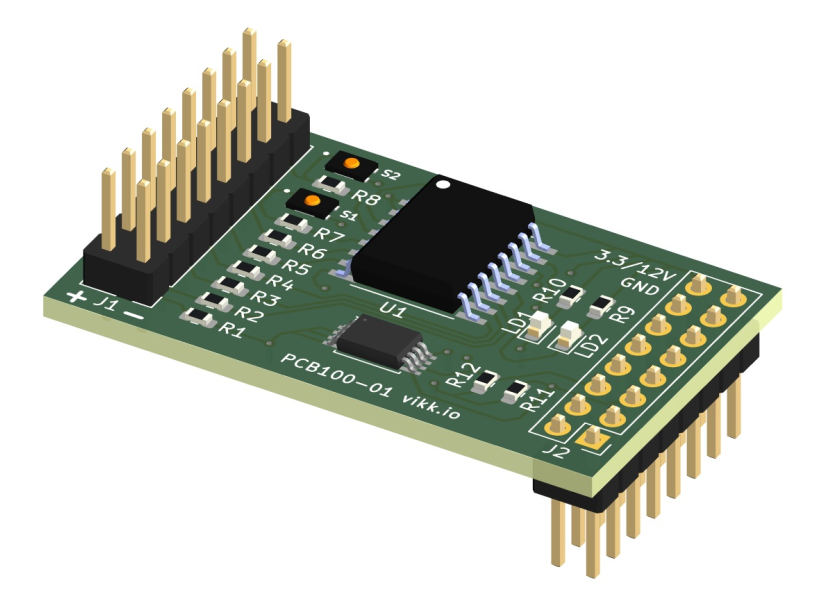
The MacchiatoBin does not have standard ATX connections for LEDs and Buttons, the ioext board is attached to the J12 header on the MacchiatoBin and offers several LED-suitable GPIOs:
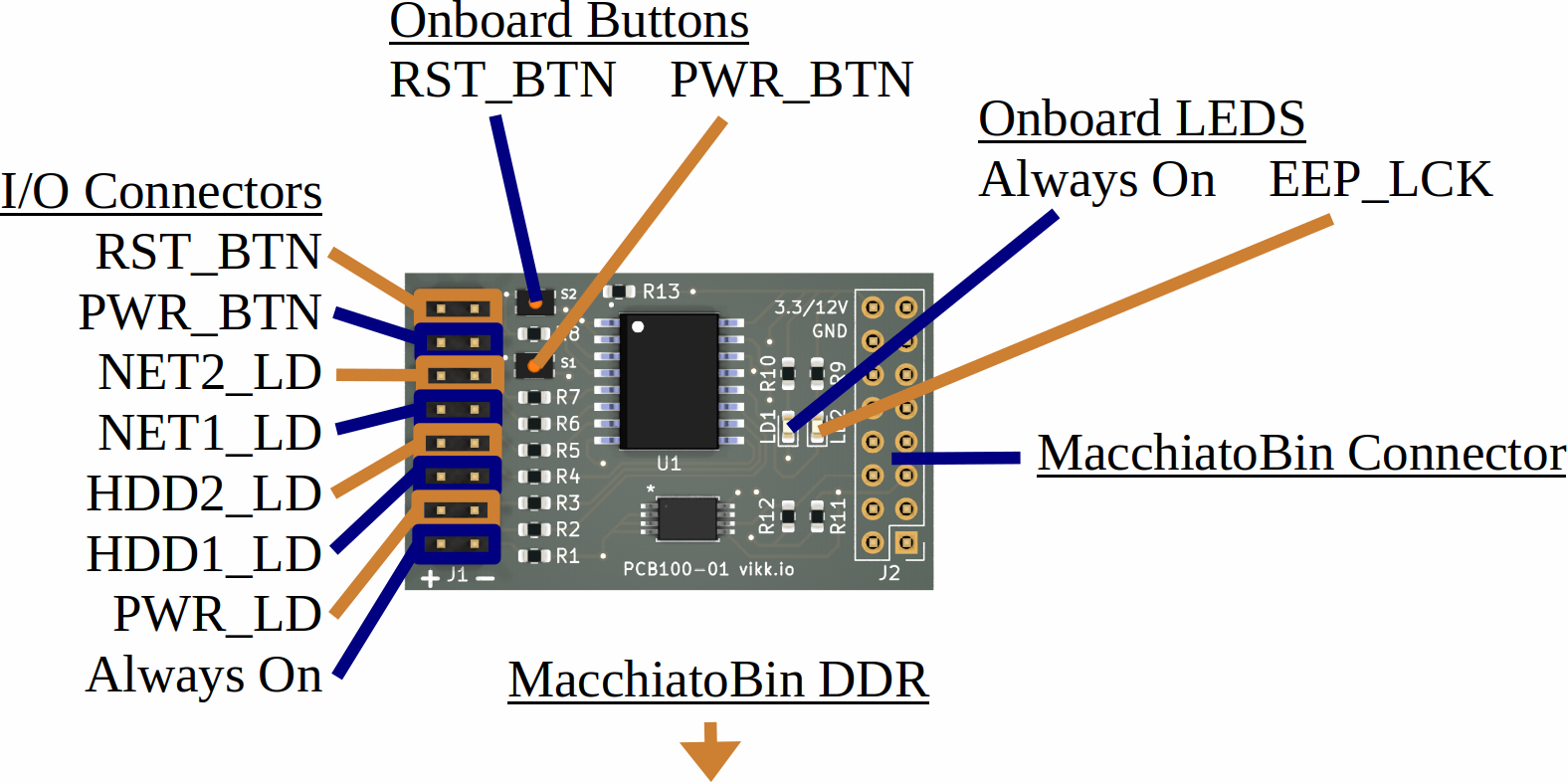
Connections
- Always on pins depending on use case
- PWR_LD: Configurable LED indicating power state
- NET1_LD: Configurable LED indicating network activity
- NET2_LD: Configurable LED indicating network activity
- HDD1_LD: Configurable LED indicating disk activity
- HDD2_LD: Configurable LED indicating disk activity
- PWR_BTN: Configurable button for power off
- RST_BTN: Configurable button for soft reboot
- EEP_LCK: Configurable to lock EEPROM, for future use
- EEPROM: 4k for future use
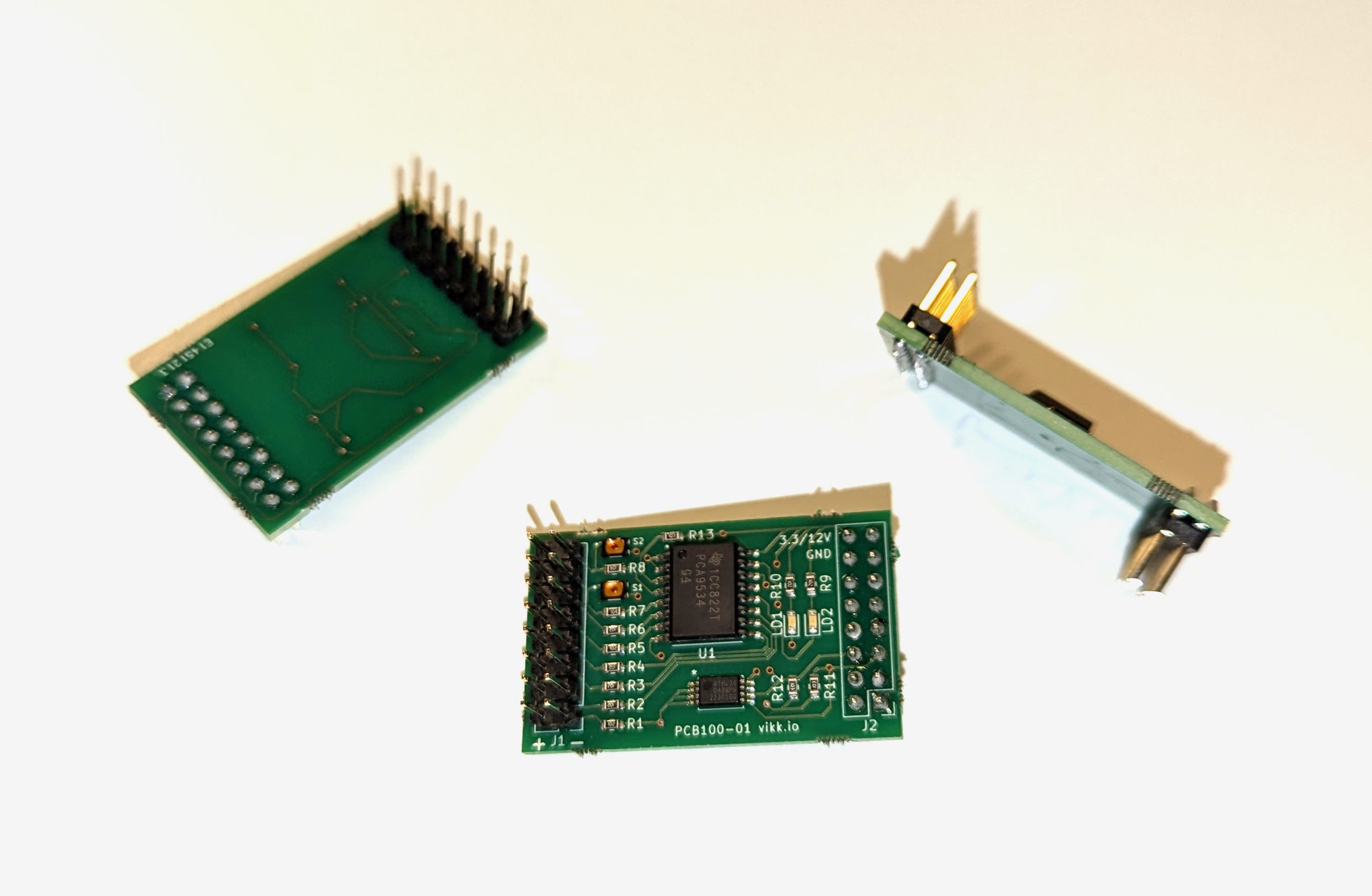 Final product |
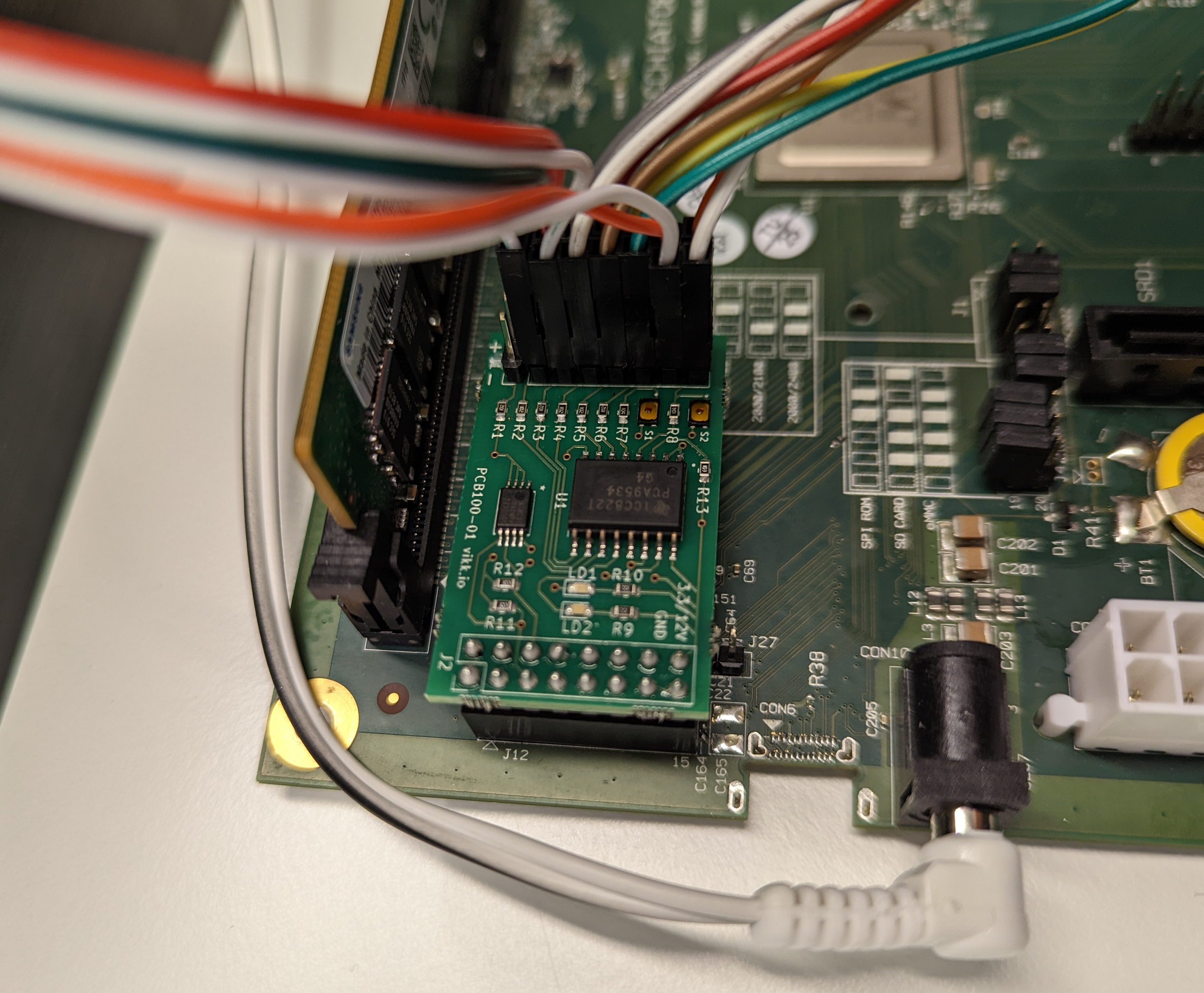 Mounted on MacchiatoBin with connectors |
IO Shield

A basic shield for ATX cases CAD and STL files